The earlier parts of this series were about concepts, deployment, frameworks, and skills.
This one is about the much less glamorous part that usually costs more than people expect:
After launch, systems rarely die because nobody can write a server. They die because you assumed the wrong layer was already healthy.
As soon as you put a FastMCP server on Oracle VM, add Cloudflare, nginx, systemd, .env, and a Make adapter, you start seeing the same family of illusions:
- The VM has a public IP, so why is it still unreachable?
curl localhostworks on the machine, so why is 443 still refused from outside?/mcpreturns406 Not Acceptable. Is the app broken, or is the client speaking the wrong transport?- nginx is active, so why can ChatGPT still not list tools?
- The repo is updated. Why is the live server behaving like yesterday?
This is not a diary of random frustrations.
It is an attempt to turn them into an operations playbook.
Because the only useful pitfall post is the one that teaches the next person:
When the same thing breaks again, which layer should you inspect first?
My current conclusion: debug by layers, not by features
My original instinct was always feature-first:
- Maybe FastMCP is misconfigured
- Maybe the skill loader is broken
- Maybe the tool descriptions are out of sync
- Maybe the Make adapter is timing out
All of those are plausible.
None of them are a great first move.
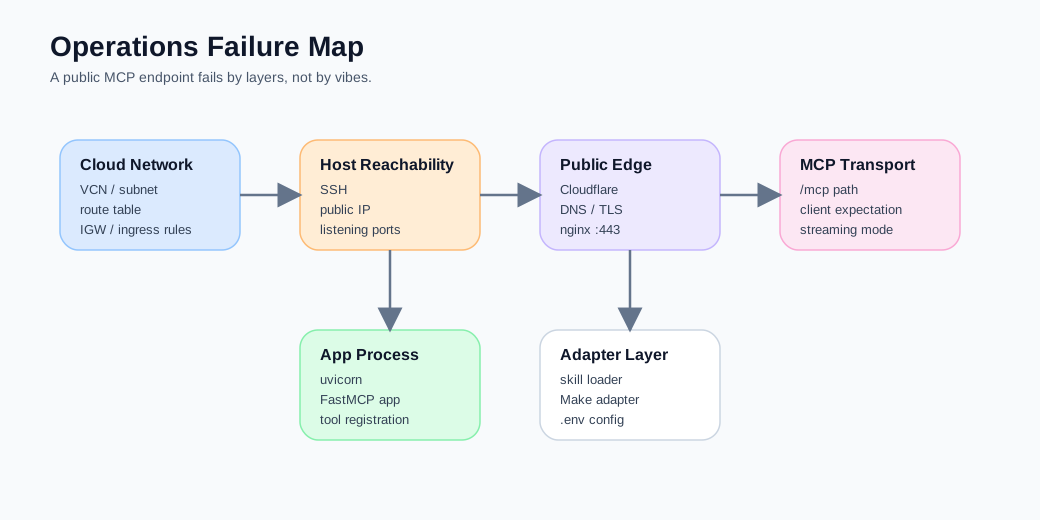
Once a remote MCP server is live, the most common failures are not “a feature went wrong”. They are “an entire layer is not actually in place yet”.
The troubleshooting order that now works much better for me is:
-
Cloud network layer
VM, public IP, route table, internet gateway, security rules. -
Host reachability layer
SSH, OS, systemd, listening ports. -
Reverse proxy layer
nginx, TLS, DNS, Cloudflare proxying, origin certificates. -
MCP transport layer
/mcppath, transport expectations, streaming behaviour. -
Application and tool layer
FastMCP app, tool registration, skill loading, Make adapter, environment variables.
Once that order becomes muscle memory, a lot of supposedly mysterious errors shrink back into their proper category.
Pitfall 1: a public IP does not mean your VM is truly public
This is probably the most common Oracle VM trap.
Oracle’s documentation on public subnets and internet gateways is quite clear:
a public IP is only one piece. You also need:
- a subnet route table that actually sends internet-bound traffic to an internet gateway
- security lists or NSGs that allow the relevant ingress and egress
- the host itself listening on the ports you care about
So when you see a public IP, the first question should not be “why is FastMCP broken?” It should be:
Is this machine, right now, actually functioning as a host that the internet can reach?
My first verification sequence now
Before touching /mcp, I verify these three things:
ssh -i /path/to/private-key ubuntu@<PUBLIC_IP>curl -I http://<PUBLIC_IP>sudo ss -ltnp | grep -E ':22|:80|:443|:8000'If SSH is shaky or the box is not even listening on 80 or 443, it is a network problem, not a FastMCP problem.
One particularly sneaky Oracle networking trap
I also ran into a route-table trap that is worth writing down.
Some route tables are already attached for internet gateway ingress routing purposes.
Those tables are not the same thing as the ordinary public-subnet route tables you want for outbound internet traffic. That means you can end up trying to add:
0.0.0.0/0 -> Internet Gatewayand get an error that makes very little sense in the moment.
My now-preferred solution is boring but reliable:
- do not fight the existing table
- create a fresh public route table
- explicitly bind the public subnet to that table
It is not elegant. It is stable.
Pitfall 2: port 22 working does not mean 443 is working
Another very common illusion is this:
I can SSH into the box, so the network must be fine.
No.
SSH is 22/tcp.
A public MCP endpoint is almost certainly 443/tcp.
Those are not the same path, not the same rules, and not the same user experience.
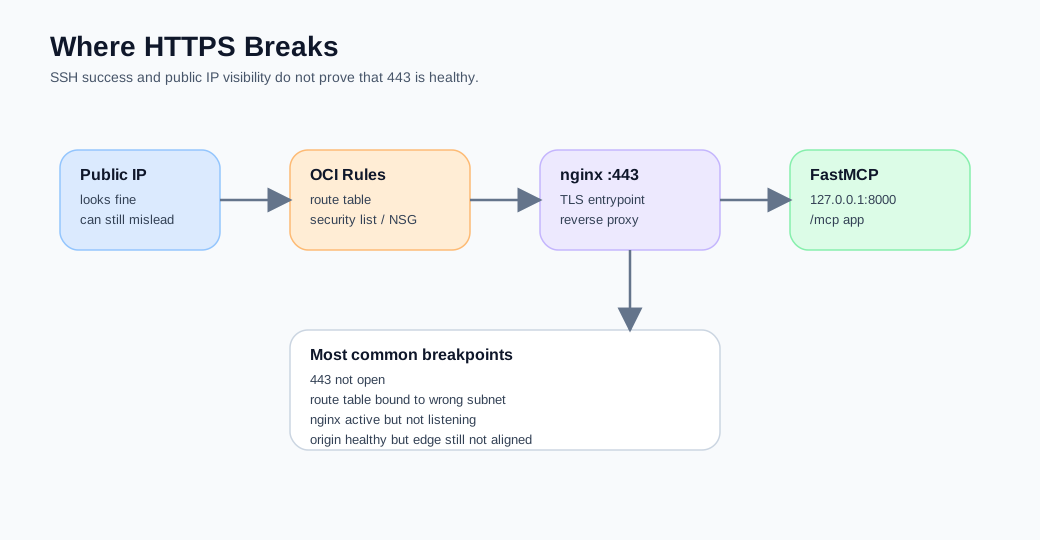
Oracle’s own guidance on ingress rules makes this explicit: if you do not add an HTTPS ingress rule for port 443, inbound HTTPS is not allowed. So you can absolutely end up in a situation where:
- SSH works
- you can log in
- nginx is active on the machine
- external HTTPS still times out or gets refused
My minimum HTTPS checklist
sudo ss -ltnp | grep ':443'sudo systemctl status nginx --no-pagercurl -vk https://<DOMAIN>/mcpIf nothing is listening on 443, do not blame Cloudflare yet.
If 443 is listening internally but the outside world still gets refused, check Oracle ingress rules before you check Python.
Pitfall 3: localhost on port 8000 is alive, but the outside world still has no idea
I strongly recommend one deployment principle for this sort of system:
Keep FastMCP on loopback. Let nginx own the public entry point.
That buys you several things at once:
- the app itself is not directly exposed to the public internet
- TLS and routing are handled by nginx
- you can swap uvicorn or app processes more safely
- debugging is easier because internal app health and external entrypoint health are separated
But it also creates a fresh trap.
You test this on the VM:
curl http://127.0.0.1:8000/mcpIt works.
You feel relieved.
The deployment is not done.
Because the public path is still:
Internet → Cloudflare → nginx :443 → 127.0.0.1:8000Any broken layer in the middle means the outside world still cannot see your server.
The inside/outside double-check I now always do
Inside the VM:
curl -i http://127.0.0.1:8000/mcpOutside the VM:
curl -i https://mcp.example.com/mcpOnly when both work do I move on to tool listing.
If only the first works, the app is alive, but the deployment is not complete.
Pitfall 4: 406 Not Acceptable does not necessarily mean the server is down
This one is absolutely worth keeping in the post because it is so easy to misread.
The first time I got a 406 Not Acceptable from /mcp, my instinct was:
- nginx headers are wrong
- FastMCP failed to start correctly
- the app path is wrong
What I had to learn instead was much simpler:
An MCP endpoint is not a homepage. It is a protocol entrypoint.
If the client is not speaking the expected transport, not negotiating the right response type, or just poking the endpoint like a generic website, a 4xx response is not surprising.
MCP evolved in 2025 from the older HTTP+SSE transport to Streamable HTTP, and FastMCP now recommends Streamable HTTP for new production deployments while keeping SSE for backward compatibility. That means /mcp is not a “show me something pretty” URL. It is part of a transport contract. citeturn677151view5turn677151view4turn677151view3
My operational rule now
If /mcp gives you a 406, do not immediately classify it as “the server is broken”.
Ask these first:
- Is this actually an MCP-aware client?
- Is the path correct?
/mcpor/mcp/? - Are you simply using a browser or a generic curl call on a protocol endpoint?
In other words, 406 often means the transport conversation is wrong, not that the app is dead.
Pitfall 5: Cloudflare is very good at making origin problems look different
Cloudflare is extremely useful.
It is also very good at disguising the original failure mode.
For example:
- DNS existing does not mean the origin is reachable
- the wrong SSL mode can make an origin problem feel like a TLS problem
- when the proxy is on, what you see is edge behaviour, not raw VM behaviour
So when an external request fails, I now split the investigation on purpose.
First: inspect the origin itself
On the VM:
sudo systemctl status nginx --no-pager
sudo journalctl -u job-mcp.service -n 50 --no-pager
sudo ss -ltnp | grep -E ':443|:8000'
Then: inspect the public route through Cloudflare
curl -vk https://mcp.example.com/mcpI try hard not to begin at the Cloudflare layer unless I already know the VM side is healthy.
Pitfall 6: systemctl status is not frozen, you just fell into a pager
This is a tiny pitfall, but a real one.
The first time you run:
systemctl status job-mcp.serviceand the screen looks “stuck”, it is easy to have one second of existential doubt.
Usually nothing is wrong. You just landed in a pager.
So I now use these versions by default:
systemctl status job-mcp.service --no-pager
systemctl cat job-mcp.service --no-pager
journalctl -u job-mcp.service -n 100 --no-pager
That is not sophistication. It is simply a way to remove one needless source of misreading.
Pitfall 7: the repo changed, but the live server did not
This is one of my favourite operational truths:
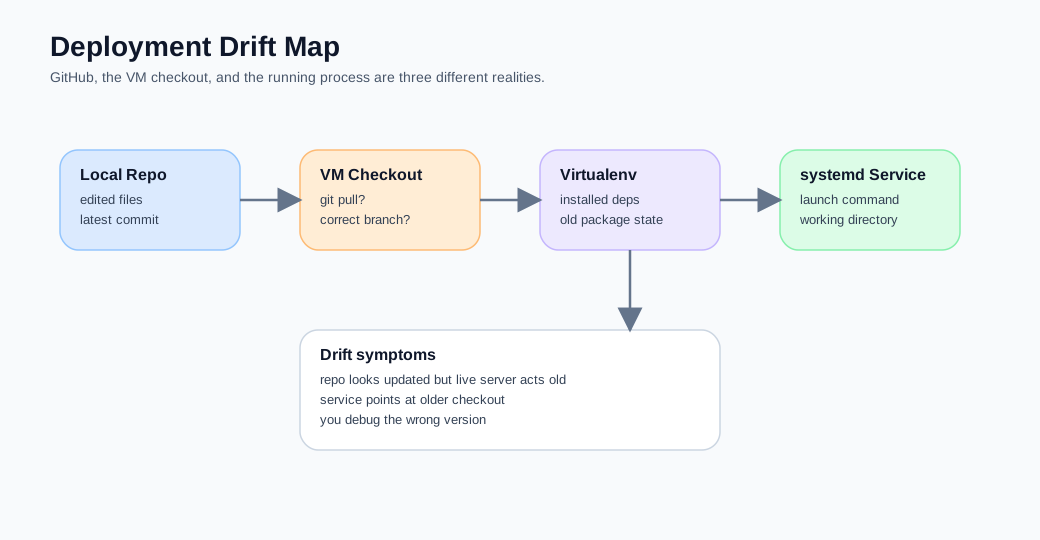
The state of GitHub and the state of the live process are not the same thing.
You might update:
server.pytool_definitions.py- the skill loader
.env.example- nginx notes
But the VM may still be running an older checkout, an older virtual environment, or an older systemd launch command.
The checks I now always run
cd /opt/job-mcp/app
git rev-parse --short HEAD
git status
systemctl cat job-mcp.service --no-pagersed -n '1,220p' /opt/job-mcp/app/mcp_server/app/server.pyThese commands are not glamorous. They are how you avoid one of the most expensive categories of confusion:
You are debugging the code you think is running, not the code that is actually running.
Pitfall 8: you can inspect .env without using the most dangerous method
Once the system is live, the most natural impulse is:
cat .envI now consider that a bad default.
A production-ish .env often contains:
- API keys
- Make auth settings
- adapter configuration
- host-facing secrets
A safer pattern is to inspect variable names first, not values.
For example:
grep -E '^[A-Z0-9_]+=' /opt/job-mcp/app/.env | cut -d= -f1 | sort -uor:
awk -F= '/^[A-Z0-9_]+=/{print $1"=<hidden>"}' /opt/job-mcp/app/.envIt is boring. It is also how you reduce avoidable accidents.
Pitfall 9: do not let FastMCP become your second workflow brain
This final pitfall is more architectural, but still belongs in an operations article.
Once a FastMCP server is live, there is always a temptation to:
- expose more tools
- wire in more backends directly
- push more strategy into the server
If you keep doing that, the server slowly grows into another workflow brain.
My current operating principles are:
- expose only skill-level or clearly contracted tools
- keep the server thin
- leave execution-heavy work in Make or in a controlled adapter layer
- stabilise the public entrypoint before expanding capability surface
In other words, an operations manual is not there to help you add more features. It is there to stop you from muddying the boundaries you just worked so hard to clean up.
My current runbook
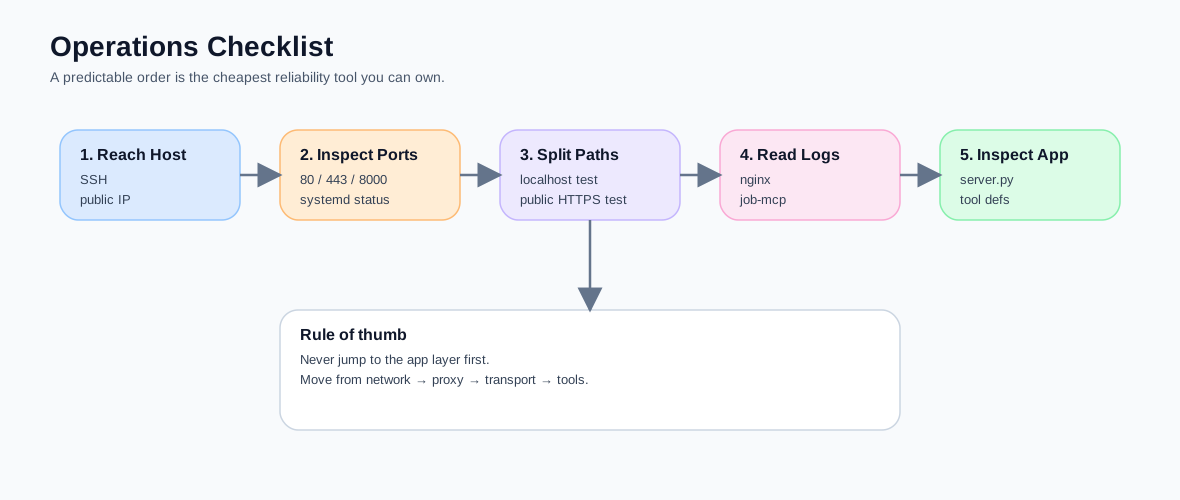
If someone had to take over this Oracle VM + FastMCP + Cloudflare system tomorrow, the first thing I would give them would not be a backstory. It would be this order of operations.
Step 1: confirm the host is alive
ssh -i /path/to/private-key ubuntu@<PUBLIC_IP>Step 2: inspect ports and services
sudo ss -ltnp | grep -E ':80|:443|:8000'
systemctl status nginx --no-pager
systemctl status job-mcp.service --no-pager
Step 3: separate the inside path from the outside path
curl -i http://127.0.0.1:8000/mcp
curl -vk https://mcp.example.com/mcp
Step 4: inspect logs
journalctl -u job-mcp.service -n 100 --no-pager
journalctl -u nginx -n 100 --no-pager
Step 5: only then go back to app and tool code
sed -n '1,220p' /opt/job-mcp/app/mcp_server/app/server.py
sed -n '1,260p' /opt/job-mcp/app/mcp_server/app/tool_definitions.py
The value of this order is not that it looks clever. It is that it prevents you from diving into the wrong layer too early.
The counterexample I want to leave here
I also want to keep one counterexample in the article so it does not become another “just follow the checklist and all will be well” post.
Not every issue deserves to be solved with more observability or more framework features.
Sometimes the truth is just:
- port 443 is not open
- the route table is wrong
- nginx was not reloaded
- the service is running an older build
- you hit a protocol endpoint with a generic client
If your first reaction is always “maybe we need another proxy, another monitoring agent, another layer”, you often end up polishing the floor instead of opening the door.
One honest ending: operations are half the engineering work of a self-hosted MCP server
If Part 2 was about how to get the server online, Part 5 is about the part people underestimate:
A self-hosted remote MCP server is never finished at deploy time. A large part of the engineering cost lives in operations and troubleshooting order.
You can read that as bad news.
Or you can read it as the adult version of the trade-off:
when you stop delegating the entrypoint to a PaaS or a managed platform, you gain control, but you also inherit more truth.