Audience: you have already installed OpenClaw, your mainline is macOS or a Mac mini with Codex OAuth, and now you want to know what the first week should actually look like.
This is not a catalogue of every feature. It is a practical rollout order so you can move from “it runs” to “it is starting to do real work”.
The main idea
The first-week mistake is rarely a single wrong command.
It is opening too much, too early.
It is tempting to do all of this at once:
- connect Discord
- test the browser tool
- install a pile of skills
- enable heartbeat
- expose it remotely
- make it feel like a full-time personal assistant on day one
That is how you end up with a noisy, impressive mess.
So the argument in this article is simple:
In week one, do not optimise for feature count. Optimise for a stable rollout order.
You want OpenClaw to become a system you can observe, correct, and predict.
Until that happens, every extra capability only increases your blast radius.
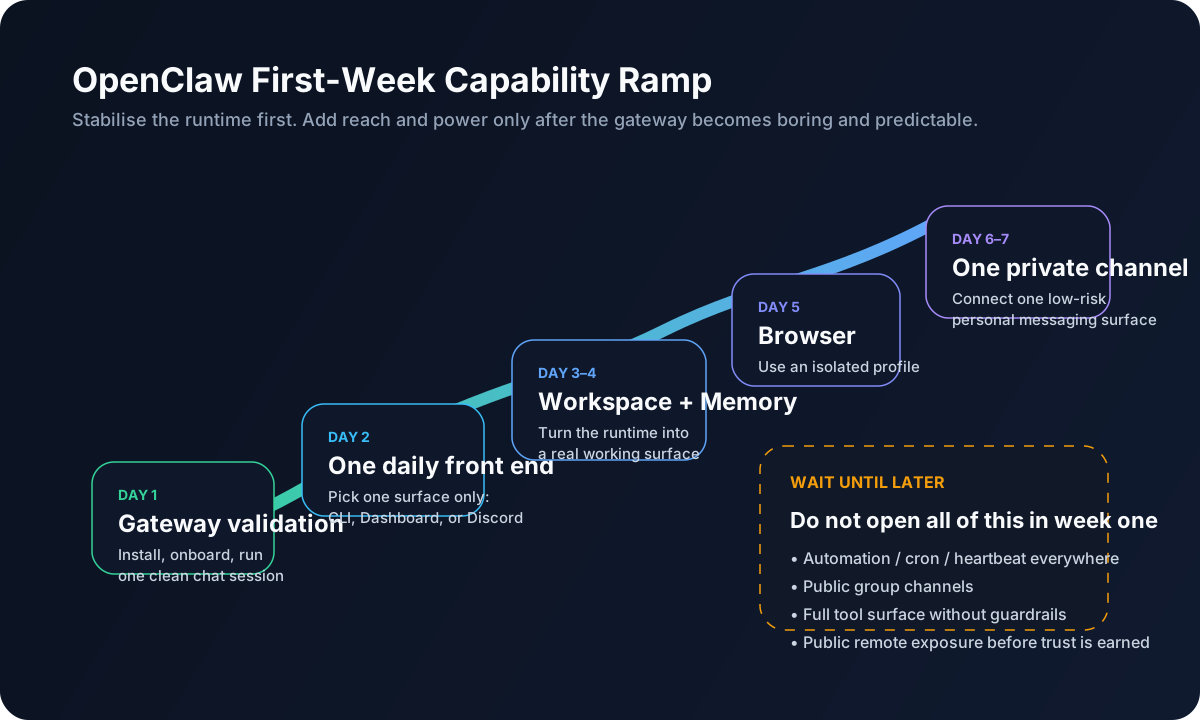
Why the order matters more than the checklist
The official Getting Started guide keeps the entry point deliberately plain: install it, run onboarding, bring up a working Gateway, and complete a chat session. The Gateway runbook also clearly separates day-one startup from day-two operations. That is a strong hint. OpenClaw is not asking you to turn on everything in one sitting. It is asking you to stabilise the runtime first.
I would take that idea one step further on Daniel’s path.
This series is not about a flashy demo. It is about putting OpenClaw on a Mac mini and letting it become part of a long-running personal workflow. That kind of setup does not fail because it lacks one more feature. It fails because it becomes hard to trust.
Day 1: prove that it is not a fake success
If you have just finished installation, this is the first command ladder I would run:
openclaw status
openclaw models status
openclaw doctor
openclaw gateway status
openclaw dashboard
These commands do not look glamorous, but they matter.
You need to know:
- whether the Gateway is really alive
- whether model auth is actually valid
- whether Doctor already sees structural problems
- whether the dashboard can connect properly
- whether your success is deeper than “that one terminal was still open”
What counts as success on day one
- You understand that the Gateway is the source of truth, not the visible front end.
- You know where to look when the dashboard fails to connect.
- You know the difference between
status,models status, anddoctor. - You have completed a real local chat, not just watched onboarding print a cheerful message.
If that foundation still feels wobbly, stop there for the day.
Day 2: choose one front end you will actually use
A common beginner pattern is to open everything:
- TUI
- dashboard
- Discord
- maybe your phone
- maybe the browser tool as well
That feels like progress, but it does not build a daily habit.
My week-one recommendation is to choose one main front end.
For Daniel’s path, I would make it:
- Primary: Dashboard
- Secondary: TUI
The dashboard is good for session feel, state inspection, and day-to-day interaction.
The TUI is a strong companion when you are on the host and want fast, operator-style checks.
What not to do yet
- Do not make Discord your main working surface immediately.
- Do not make remote phone access your primary control loop.
- Do not train yourself across four interfaces at once.
You are not trying to maximise exposure.
You are trying to build one stable gesture you will repeat every day.
Day 3: treat the workspace like a working area, not just a config folder
The official Personal Assistant Setup and Memory Overview make this very clear: OpenClaw’s instructions, operating style, and saved memory all live in the agent workspace.
That means day three is not the day for more add-ons.
It is the day you start getting a feel for the workspace itself.
At minimum, understand the role of these files:
AGENTS.mdSOUL.mdTOOLS.mdMEMORY.mdmemory/YYYY-MM-DD.md
Do not write a novel into the workspace
Start smaller than that.
Useful early entries include:
- your main use cases
- your red lines
- the repo or paths you use often
- how you want results reported back
- what belongs in durable memory versus just today’s context
Think of MEMORY.md as the long-term layer and memory/YYYY-MM-DD.md as the daily notebook.
A good rule
Do not try to turn every chat into memory.
MEMORY.md is usually for:
- stable preferences
- persistent background context
- fixed environment details
- common repos or paths
- durable guardrails
It is usually not for:
- a one-off question from today
- random brainstorm debris
- unverified conclusions
- temporary instructions you only care about this afternoon
Day 4: start building session hygiene
This is the step people often learn too late.
For me, OpenClaw starts feeling like a real system when you develop session discipline:
- use
/newor/resetwhen a task boundary is real - compact when the session is getting bloated
- stop treating transcript and memory as the same thing
My two week-one habits
- Start a fresh session when the task changes.
- Compact when the context is getting swollen.
That sounds mundane, but it changes everything.
You start to notice:
- which tasks actually belong in one session
- which tasks are only being forced together
- which facts should move into memory
- which clutter should stay in the transcript and die there
This is how you stop the context from turning into a fuzzy ball of seaweed and old tool output.
Day 5: open the browser only when it earns its place, and start with the openclaw profile
The current browser docs draw a very useful boundary:
- the
openclawprofile is an agent-only browser lane - it does not touch your personal browser profile
- the built-in
userprofile attaches to your real Chrome session - for logged-in sites, the recommended path is manual login
- do not hand your credentials to the model
That matters a lot in the first week.
My current rule
Use the browser as a research lane first, not as a master key to your personal accounts.
Good first-week browser tasks:
- reading docs
- navigating public sites
- collecting information
- taking screenshots
- stepping through low-risk pages
What I would avoid immediately:
- making the
userprofile your default path - treating it like full personal-account automation on day one
- assuming “browser” means “full computer control”
- stress-testing anti-bot login flows for sport
The browser can feel dramatic very quickly.
But dramatic is not the same thing as stable.
Day 6 to Day 7: add one private channel, and start with DM
Only after local use feels boring in the good way would I connect a private channel.
My preferred first choices are:
- Discord DM
- or Telegram
Not a public server, not a noisy group, and definitely not a wide-open shared surface.
Why? Because the moment you add a channel, the problem becomes a composite of:
- external input
- auth
- routing
- access policy
- failure modes you did not have on localhost
The Discord docs and channel troubleshooting pages are refreshingly blunt here:
- start in a private environment
- pairing is not the same thing as allowlisting
- mention-gating is not the whole access model
openclaw channels status --probeis a very good health check
The week-one play
- start with DM
- get pairing to succeed
- verify allowlist or sender policy
- keep the set of users small
- do not promote it into a shared group just because it technically works
When this step goes well, OpenClaw finally starts to feel like more than a local tool. It begins to feel like a persistent agent you can wake up from another surface.
What should stay closed in week one
I want to say this quite directly.
1. Do not enable heartbeat too early
The official personal assistant guide is explicit: heartbeat runs full agent turns, and shorter intervals burn more tokens. If you do not yet trust the baseline, heartbeat just turns uncertainty into scheduled uncertainty.
2. Do not rush into cron
Cron is useful, but it is a scheduler, not a toy.
Until you understand delivery, sessions, and notification strategy, do not send the lobster out on daily patrol.
3. Do not switch to tools.profile: full just because something is blocked
That is one of the most common early overreactions.
The real question is which layer is stopping you, not how quickly you can kick every door open.
4. Do not jump straight to public remote exposure
The Control UI docs and security docs both point in the same direction: localhost and remote exposure are not the same risk tier. In week one, 127.0.0.1 is a perfectly respectable home.
5. Do not turn skills into a shopping spree
Skills are useful, but they also enter the prompt and carry supply-chain implications.
A good week-one skill strategy is “small and necessary”, not “everything with a cool name”.
My preferred week-one cadence
If I had to compress it into a single practical table, it would look like this:
| Time | Goal | Do | Avoid |
|---|---|---|---|
| Day 1 | Validate the runtime | status, models status, doctor, dashboard, local chat | external channels |
| Day 2 | Build one daily interface habit | choose dashboard or TUI as the main lane | juggling four entry points |
| Day 3 | Make the workspace real | tune AGENTS.md, SOUL.md, MEMORY.md | saving every thought as durable memory |
| Day 4 | Build session hygiene | /new, /compact, cleaner task boundaries | one giant everything-session |
| Day 5 | Open the browser | use the openclaw profile, public docs, low-risk flows | attaching your real signed-in browser first |
| Day 6–7 | Add one private channel | Discord DM or Telegram, pairing, allowlist | public groups and wide-open access |
The spirit of the table is not that every reader must obey the calendar literally.
It is this:
Each outer layer should only open after the previous layer already feels boring.
What “success” looks like after week one
Week one is not successful because OpenClaw has become a steel butler.
It is successful if:
- you understand that the Gateway is the source of truth
- you have one main front end you genuinely use
- the workspace no longer feels like a mysterious black box
- transcript and memory are starting to feel different
- you know what risk tier the browser belongs to
- you have successfully woken the agent from one private channel
- you did not accidentally create a permission-hungry creature on your first pass
That is the real bridge from “installed” to “starting work”.
Final thought
My week-one test is now very simple:
I do not ask whether OpenClaw can do many things. I ask whether I would trust it to still be sitting there tomorrow.
If the answer is no, the problem is usually not lack of power.
It is rollout speed.
Build the first week like a slope, not an explosion. The skills, remote access, automation, and more advanced routing can come later.
Image Asset Plan
- filename: openclaw-getting-started-04-first-week-ramp.svg
purpose: Show the staged first-week rollout for OpenClaw so readers do not open browser, channels, and automation all at once.
placement: After the section introducing the rollout order.
alt: OpenClaw first-week capability ramp
prompt: A clean blog-friendly SVG showing a staged OpenClaw first-week rollout: day 1 gateway validation, day 2 one daily front end, day 3-4 workspace and memory, day 5 browser with isolated profile, day 6-7 one private channel. Add a separate “wait until later” area for automation, public groups, full tools, and public remote exposure. Modern product-documentation style, soft colours, rounded boxes, English labels.